Today lets learn how to make use of ngClass angular directive in our Ionic 2 application.
Related Read:
ngIf, index, first, last: Ionic 2
ngClass Directive: Ionic 2
Company Names: src/pages/home/home.ts
import { Component } from '@angular/core'; @Component({ selector: 'page-home', templateUrl: 'home.html' }) export class HomePage { items: any = []; constructor() { this.items = [ 'Microsoft', 'Apple', 'Oracle', 'Google', 'IBM', 'Tesla', 'Technotip' ]; } } |
We have an array of company names which is being assigned to variable items.
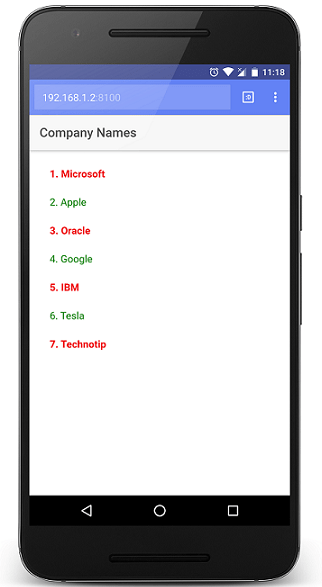
Output
Microsoft
Apple
Oracle
Google
IBM
Tesla
Technotip
CSS Class: src/pages/home/home.scss
page-home { .bold{ font-weight: bolder; } .normal{ font-weight: normal; } } |
We define two CSS classes which we use to apply for alternate list items – using ngClass directive. Alternatively the list items appear in bold and in normal font weight.
ngClass Directive – using ternary operator: src/pages/home/home.html
      Company Names


    {{i+1}}. {{item}}
|
Here we use ternary operator and whenever i % 2 is zero we apply bold class to that item, if not we apply normal class to that list item.
ngClass Directive: src/pages/home/home.html
      Company Names


    {{i+1}}. {{item}}
|
This is yet another way of doing the same thing which we did using ternary operator above. Here, if i % 2 is equal to zero, then bold class will be applied, if not it won’t be applied.
changing colors: src/pages/home/home.scss
page-home { .bold{ font-weight: bolder; color: blue; } .normal{ font-weight: normal; color: green; } } |
Alternatively the list items appear in bold and in normal font weight, along with blue and green colors respectively.